November 28, 2025
A beginner-friendly guide showing how to make Geometry Dash on Scratch step by step. Simple blocks, clear logic, and smart tips. Published with Yoplay.io.
Geometry Dash may look simple at first glance—just a cube jumping over spikes—but the rhythm-tight timing makes players feel like they’re dancing on a wire. Many gamers want to create their own Geometry Dashes or remix Geometry Dash levels, and Scratch is a perfect playground to learn how everything works behind the scenes. It’s free, visual, playful, and surprisingly powerful.
This guide walks through the full process of making a Geometry Dash-style platformer on Scratch. Every step is designed so that even a brand-new player can follow along without wondering where each block lives or how to connect them. Imagine it like assembling a small machine: add one cog at a time, test it, then watch the rhythm start to flow.
Throughout the tutorial, you’ll also see how the basic engine can turn into something more extreme—speed control, list-based levels, music sync, and Geometry Dash unblocked-style endless maps. The goal is not just to "copy and finish," but to understand how the rhythm game cube behaves so that players can build their own custom twists later.
The full instructions below follow Steps 0–12 exactly as provided, with added insights and smoother explanations. In addition to the guide, it is also featured on Yoplay.io to support Scratch beginners worldwide. Yoplay.io is a site that regularly highlights browser-friendly creations and free gameplay tools.
Nothing more than:
The game you build falls into the same broad category as Geometry Dash free versions found online: platformer, rhythm tap, quick-reflex skill challenge, and is often used by kids or casual players learning logic for the first time.
This blank canvas is where your first Geometry Dash level will take shape—almost like placing an empty notebook in front of a composer before the beat begins.

Step 1 - Create a character for the game Geometry Dash
This simple square will become your “rhythm cube,” the heart of every Geometry Dash extreme jump you script later.

Step 2: Create Ground in the Geometry Dash game
A stable ground is like the pulse of a rhythm game—steady, predictable, and the thing everything else dances around.

Go to Variables → Make a Variable:

Step 4 - Create 2 variables: Y velocity and gravity
These variables are the physics engine. Without them, the cube is just a sticker glued to the screen.
In Player:
After finding the "Forever" loop under the Control section (yellow), move to the Motion section (blue) to look find the "Change" block. Finally, you can select the velocity variable by returning to Variables.
In forever:
This makes falling, landing, and jumping feel more responsive. The player cube’s movement now feels dynamic and is influenced smoothly by gravity.
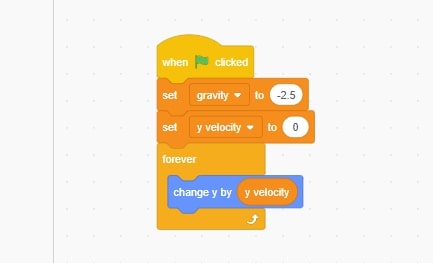
Step 5: Code for Player gravity and move according to y
Still in Player:
When space key pressed → If touching Ground → set y velocity to 20
You find when the space key pressed in Events; If then in control, Touching in sensing; finally, Set y velocity T in Variables.

Step 6 code jumps when key is pressed
The jump is crisp and rhythmic—similar to the levels new Geometry Dash maps use for beginners, where the first few jumps teach timing more than difficulty.
Same as Geometry Dash: character stands still – map runs to the left.
In Ground:
Blocks needed:
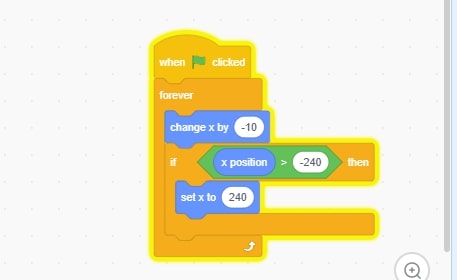
Step 7.1 - code ground scroll map run
Do the same for Spike sprites.
After completing the 2 parts, we will get the image as shown below:
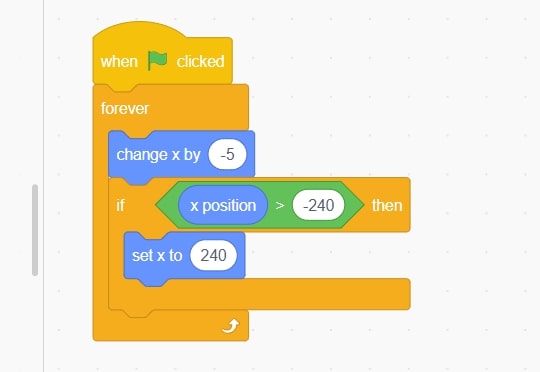
Step 7.2 - Spike code runs when the game runs
This creates the illusion that the world is rushing forward while the player remains in the same central position, giving the feeling that the player has gone very far in the game.
Now you know where the actions are, right? If you don't know all of them, use Ctrl F to search for the letter and write the code as shown below:
In Player:
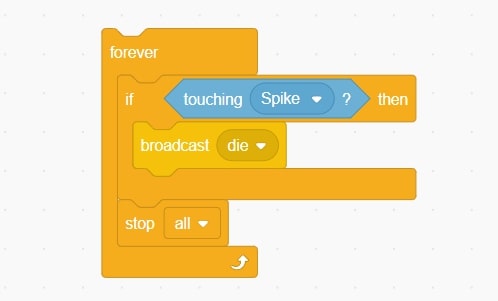
Step 8: Detect collision (game over)
This is the moment Geometry Dash is known for—the ruthless “one touch = restart.” Harsh but strangely motivating.
In Player:
It makes the cube look alive, as if rolling through rhythm rather than floating stiffly.
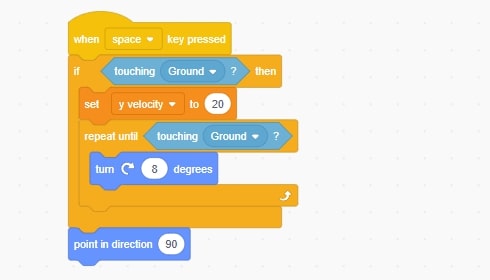
Step 9 - Spin Effect
When everything matches, the level feels less like a puzzle and more like a choreography.
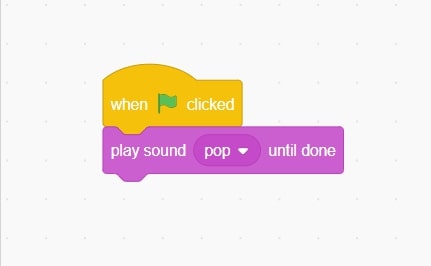
Step 10: Insert sound into game
This technique lets players create their own Geometry Dash levels quickly.
Try different settings:
A Scratch game, like clay, becomes smoother the more you shape it.
Function | Category | Block Name |
Start Game | Events | When green flag clicked |
Loop Continuously | Control | forever |
Move Map | Motion | change x by |
Reset Position | Motion | set x to |
Jump | Variables + Motion | change y by, set y velocity |
Gravity | Variables | gravity (or a custom variable named gravity) |
Check for Contact | Sensing | touching? |
Game Over | Control | stop all |
Create Variable | Variables | Make a Variable |
If you want to watch a more detailed video tutorial to create your own unique Geometry Dash game, please refer to this video series:
Geometry Dash – How to make a Scratch Game
By completing these twelve steps, you’ve built the basic engine behind Geometry Dash free browser versions and many Geometry Dashes remixes. You’ve touched physics, collision, map design, scrolling, and rhythm—all the building blocks of platformer creativity.
What begins as a square and a triangle soon evolves into a full rhythm challenge. And once the base engine exists, expanding it becomes pure fun: double jumps, portals, shifting gravity, even mini-modes. Explore, break things, fix them, and discover your own style. That’s the real spirit of Scratch.
If you want more tutorials, templates, or unblocked browser games for inspiration, you’ll often find fresh guides featured on Yoplay.io.
Geometry Dash
December 16, 2025
Dorami Geometry Dash profile exploring the mind behind The Yandere, Extreme Demon verification pressure, and why Dorami shaped modern difficulty culture.
Geometry Dash
December 12, 2025
Beyond the Extreme Demon: Unpacking the Legacy of ChaSe, the Geometry Dash Creator whose Obsession with Pure Execution Defined the Iconic Level Sidestep.
Geometry Dash
December 04, 2025
A complete guide to every key in Geometry Dash, how to collect them fast across all versions, and the simplest ways players unlock hidden areas and rewards.
Geometry Dash
November 28, 2025
Geometry Dash Deadlocked dives into extreme rhythm-platform challenges with fast reflex tests, smart patterns, and fresh level ideas, now playable free ...

Geometry Dash
December 08, 2025
Playing Geometry Dash safely on a Chromebook at school is no longer difficult after you read this article. Learn 100% working methods, limited options ...
Geometry Dash
December 12, 2025
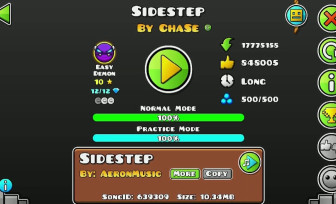
A deep gameplay-focused guide to beating Sidestep by ChaSe in Geometry Dash, exploring difficulty, practice strategy, and extreme demon skill demands.
Geometry Dash
December 04, 2025
Dive into how many people play Geometry Dash and explore its player growth, downloads, and enduring popularity — plus a look at its creator, Robert Topala ...
Geometry Dash
December 11, 2025
A practical Geometry Dash training guide that helps gamers master Ship, Wave, Ball, UFO, and more, with control tips and skill drills recommended by Yoplay.io.
Geometry Dash
November 27, 2025
Explore the Geometry Dash levels every player should know, from foundational official stages to legendary community Geometry Dashes. Master the rhythm-tap ...
Geometry Dash
December 01, 2025
An insightful look at Robert Topala, the indie developer behind Geometry Dash, tracing his creative path, design mindset, and long-lasting influence. Mention...
Geometry Dash
December 11, 2025
Beginner-friendly guide on how to use triggers in Geometry Dash. Learn core functions, simple steps, mistakes to avoid, and building tips on Yoplay.io.
Geometry Dash
December 08, 2025
Geometry Dash tests focus, memory, and reflex timing through rhythm-based obstacles. Discover how this fast platformer can boost brain skills and how to ...
Geometry Dash
December 04, 2025
A complete guide on how to get diamonds in Geometry Dash 2.2, covering every earning method, fast farming tricks, and insights for players on Yoplay.io.
Geometry Dash
December 15, 2025
The Banderelevel in Geometry Dash is an Insane Demon by Ka1ns & Wintte. This level focused on strict timing, fast pacing, and a demanding skill-based gameplay..
Geometry Dash
December 09, 2025
A deep portrait of TriAxis, the talented yet tragic female creator whose Geometry Dash levels reshaped the rhythm platformer scene before her sudden ...
Geometry Dash
December 08, 2025
Unlock Geometry Dash safely at school using proven access methods, browser platforms, and practical tricks. Learn which approaches truly work and which don’t.

Geometry Dash
November 30, 2025
A step-by-step beginner guide to becoming a skilled Geometry Dash player, covering movement mastery, mindset, and level progression. Includes insights ...
Geometry Dash
December 12, 2025
The Rupture Demystified: We dissect Ka1ns' harrowing Extreme Demon to understand its ruthless gameplay design and why, years later, it still serves as the ...

Geometry Dash
December 17, 2025
Yangire Geometry Dash Extreme Demon analysis focusing on pure execution, tight timing, and unforgiving gameplay that tests consistency and mechanical skill.
Geometry Dash
December 10, 2025
A close look at Spu7Nix's WHAT, the glitch-art level that dramatically reshaped Geometry Dash, focusing on its design and widespread community influence.